UX research

UI design

Information Architecture

SaaS

Our latest success story

Our latest success story

Re-designed the navigation that boosted usability by 50%

Re-designed the navigation that boosted usability by 50%

Learn how I used data to initiate and revamp the entire product’s navigation for all our users, and improved their efficiency and solved discoverability issues in the platform.

Learn how I used data to initiate and revamp the entire product’s navigation for all our users, and improved their efficiency and solved discoverability issues in the platform.

Learn how I used data to initiate and revamp the entire product’s navigation for all our users, and improved their efficiency and solved discoverability issues in the platform.

My Contributions

Managed end to end design experience, got deep into previous navigation data to take right decisions.

Duration

6 weeks, 3 phases to ship smoothly and address regular feedback

Key actions

Analysing data, presenting problem areas and proposing solutions

Team

2 Designers, 2 Product Managers, 4 Developers

My Contributions

Managed end to end design experience, got deep into previous navigation data to take right decisions.

Duration

6 weeks, 3 phases to ship smoothly and address regular feedback

Key actions

Analysing data, presenting problem areas and proposing solutions

Team

2 Designers, 2 Product Managers, 4 Developers

TL;DR

Quick overview of the project impact and approach

Challenge

Major discoverability and workflow challenges in Yellow.ai's B2B SaaS platform navigation

Approach

Combined analytics, customer interviews, competitor analysis, and iterative testing

Solution

Introduced collapsible left-hand navigation with phased rollout approach

Impact

50% reduction in navigation time and gained founder-level leadership buy-in

Context & Problem

Yellow.ai is a B2B SaaS platform with multiple modules: Studio, Inbox, Engage, Insights, Channels & Integrations. Each module served a unique purpose but was often interdependent with others.

Unless users clicked on it they have no idea of what the platform provides

Once you click on any of these modules, each had its own internal structure
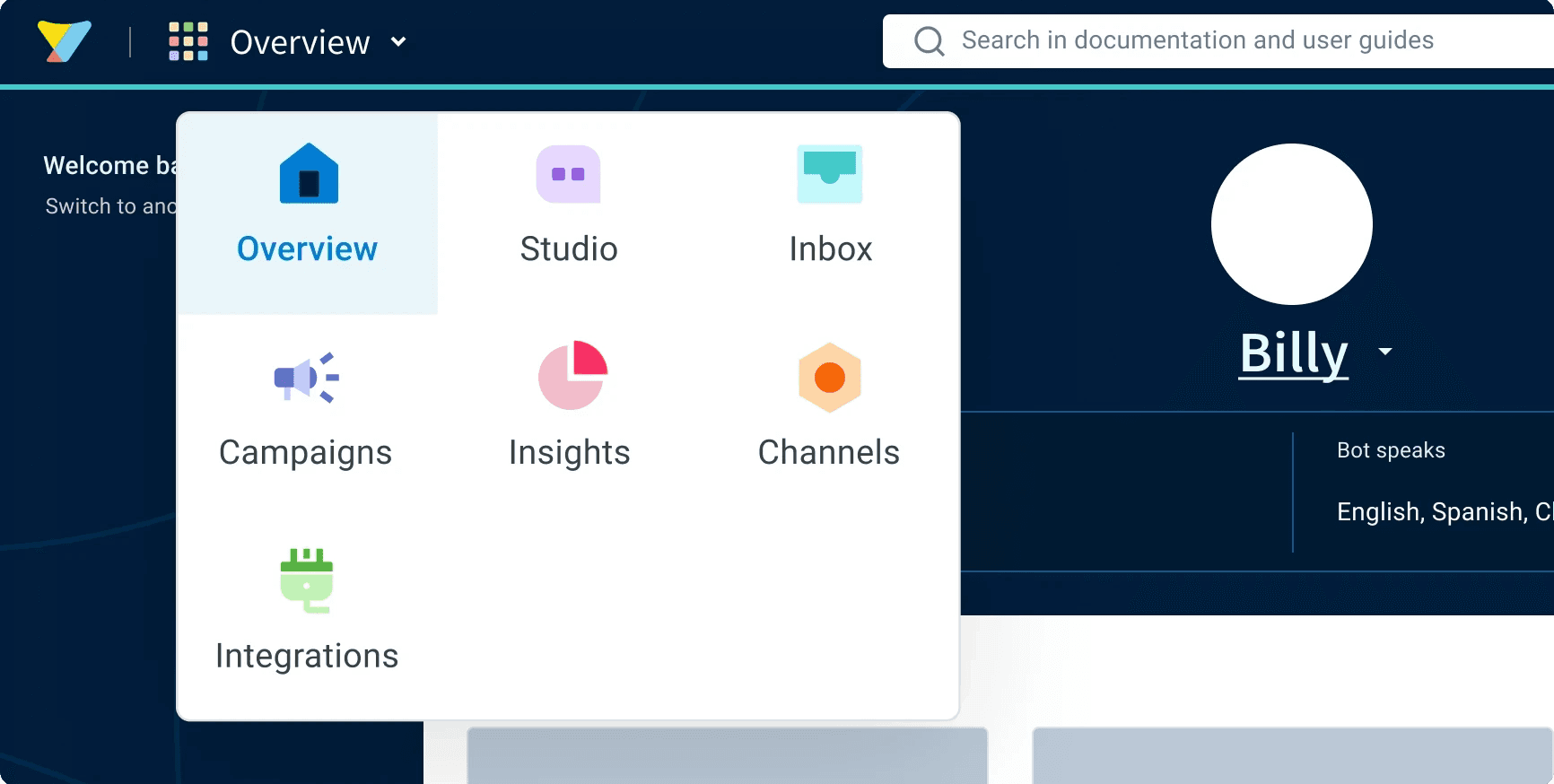
The Switcher (Primary Navigation- Before revamp)

User feedback

"Even as a power user, I end up calling support when I want to try something new."

"I know a feature exists somewhere on the platform, but I am not able find it."

Three core issues identified

70% of users frequently switched between modules. This step felt redundant and slowed them down.

1

Over-reliance on Switcher

Users didn't know what was inside modules until clicking. Even power users struggled and relied on sales.

2

Discoverability

Modules were interdependent, but the navigation didn't support smooth transitions across them.

3

Workflow Friction

Three core issues identified

70% of users frequently switched between modules. This step felt redundant and slowed them down.

1

Over-reliance on Switcher

Users didn't know what was inside modules until clicking. Even power users struggled and relied on sales.

2

Discoverability

Modules were interdependent, but the navigation didn't support smooth transitions across them.

3

Workflow Friction

Three core issues identified

70% of users frequently switched between modules. This step felt redundant and slowed them down.

1

Over-reliance on Switcher

Users didn't know what was inside modules until clicking. Even power users struggled and relied on sales.

2

Discoverability

Modules were interdependent, but the navigation didn't support smooth transitions across them.

3

Workflow Friction

User feedback

"Even as a power user, I end up calling support when I want to try something new."

"I know a feature exists somewhere on the platform, but I am not able find it."

Problem Statement

How might we

Make the switcher navigation easier to use for the 70% of users who find it confusing?

Constraints

Why wasn't this simple?

Each module had its own roadmap, priorities, and resistance to foundational changes.

Independent Teams

Risk of disrupting established workflows for every existing customer.

Customer Impact

Required phased rollout approach to minimize risk and gather validation from the customers before launch.

Required phased rollout approach to minimize risk and gather validation.

Risk Mitigation

Each module had its own roadmap, priorities, and resistance to foundational changes.

Independent Teams

Risk of disrupting established workflows for every existing customer.

Customer Impact

Required phased rollout approach to minimize risk and gather validation from the customers before launch.

Risk Mitigation

Research & Validation

Analytics (Hotjar & Mixpanel)

I approached the problem with a data-driven lens to build credibility and gain buy-in.

Hotjar recordings & heatmaps

Heatmaps indicated that users often clicked on the switcher repeatedly in their day-to-day workflow.

Mixpanel funnels & journey tracking

Showed consistent drop-offs when navigation required multiple redundant steps.

Cross-module usage analysis

Highlighted that modules weren't being used in isolation. Users almost always jumped between them.
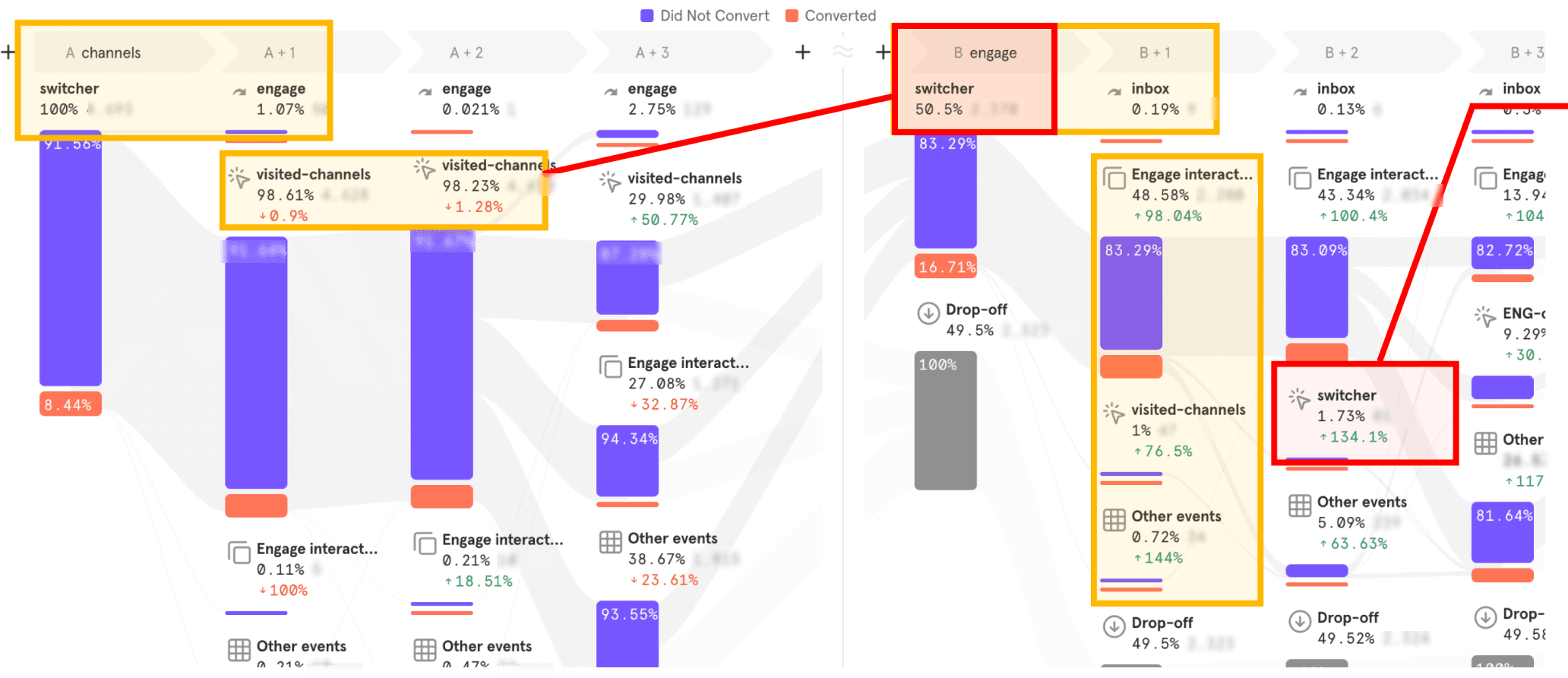
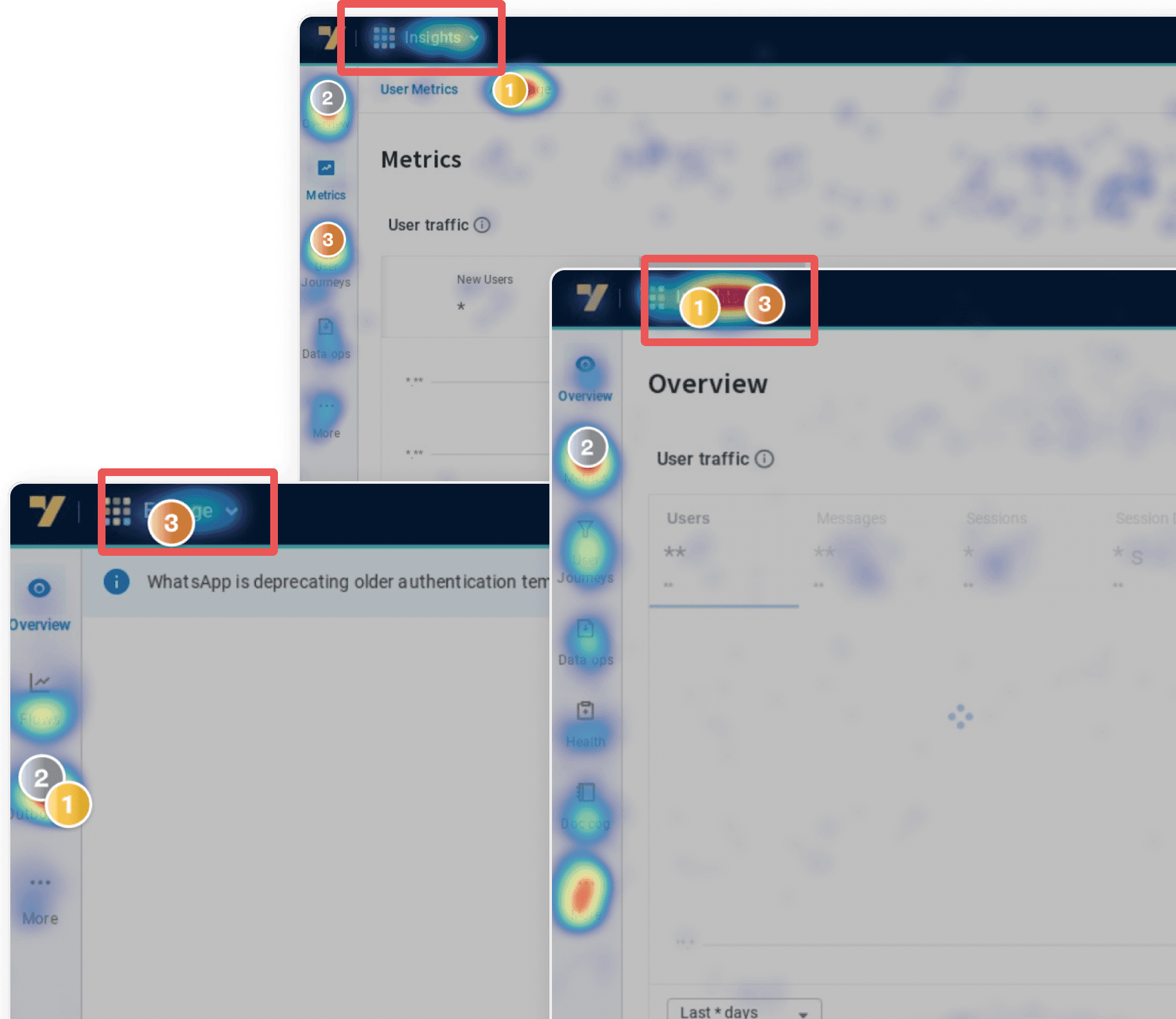
Mixpanel Funnel

Hotjar Heatmap

Mixpanel Funnel

Hotjar Heatmap

Mixpanel Funnel

Hotjar Heatmap

Customers & Stakeholders interviews

I interviewed customers directly to understand their painpoints. I also spoke to internal stakeholders: Designers, PMs and CSMs to get more insights.

5+ Customers:

Described the navigation as something they can't get used to without handholding.

6 PMs

Saw navigation is confusing users during customer demos for feature walkthroughs.

Saw navigation is confusing users during customer demos for feature walkthroughs.

4 CSMs

Highlighted that they always had to provide additional support via documentations or walkthroughs.

5 Designers

Agreed that they found the Information Architecture of their respective owned module confusing.

Exploring solutions

Analyzing Competitors

Studying how successful products structure navigation across complex workflows

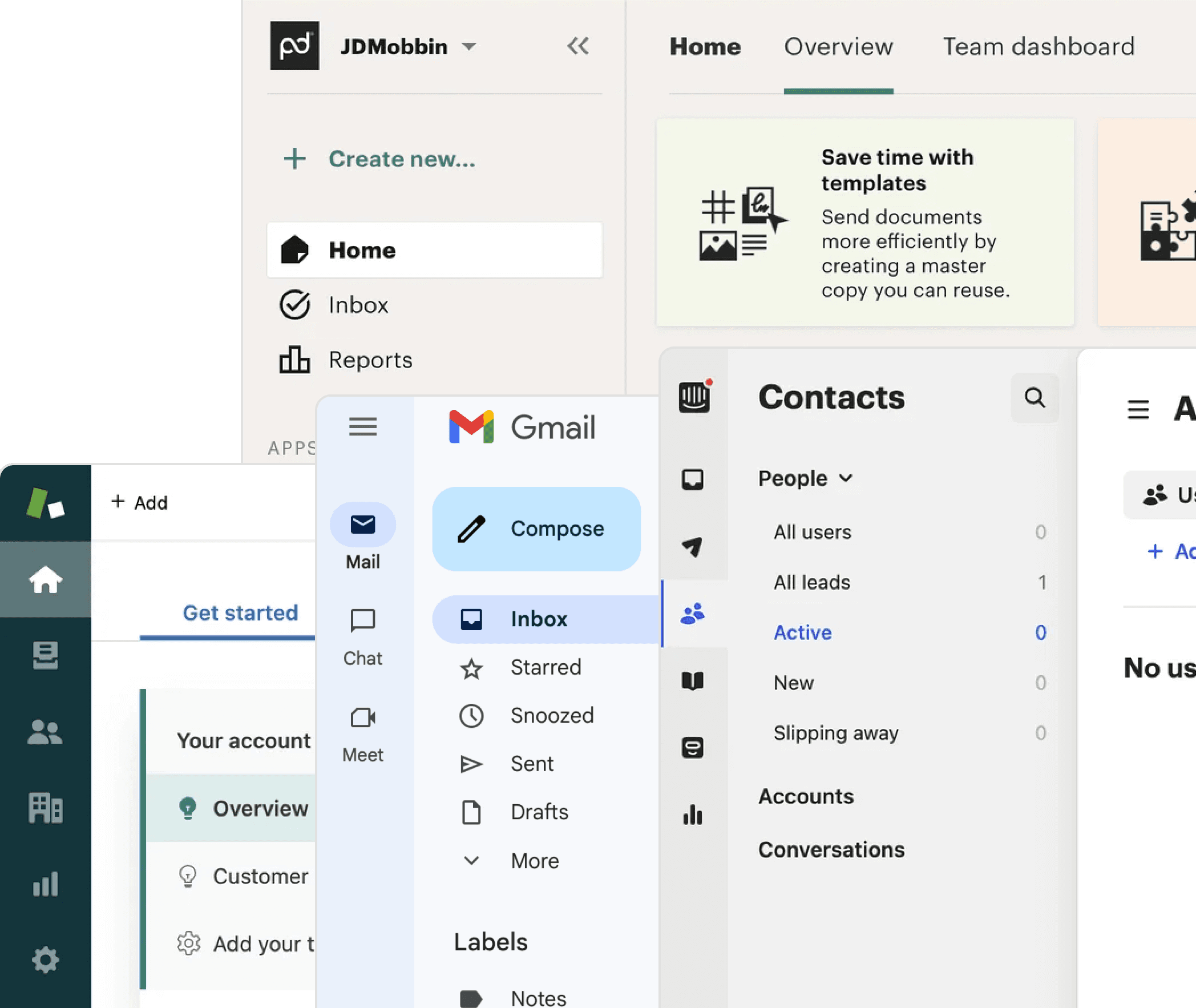
I studied direct competitors (Zendesk, Intercom) and indirect ones (Gmail, Mobbin) to understand how they structured navigation across complex workflows.

I studied direct competitors (Zendesk, Intercom) and indirect ones (Gmail, Mobbin) to understand how they structured navigation across complex workflows.

Key Learnings

Key Learnings

Learned how collapsible states helped save workspace.

Observed how primary, secondary, and tertiary hierarchies were represented in successful products.

This gave me inspiration for scalable IA patterns we could adapt.
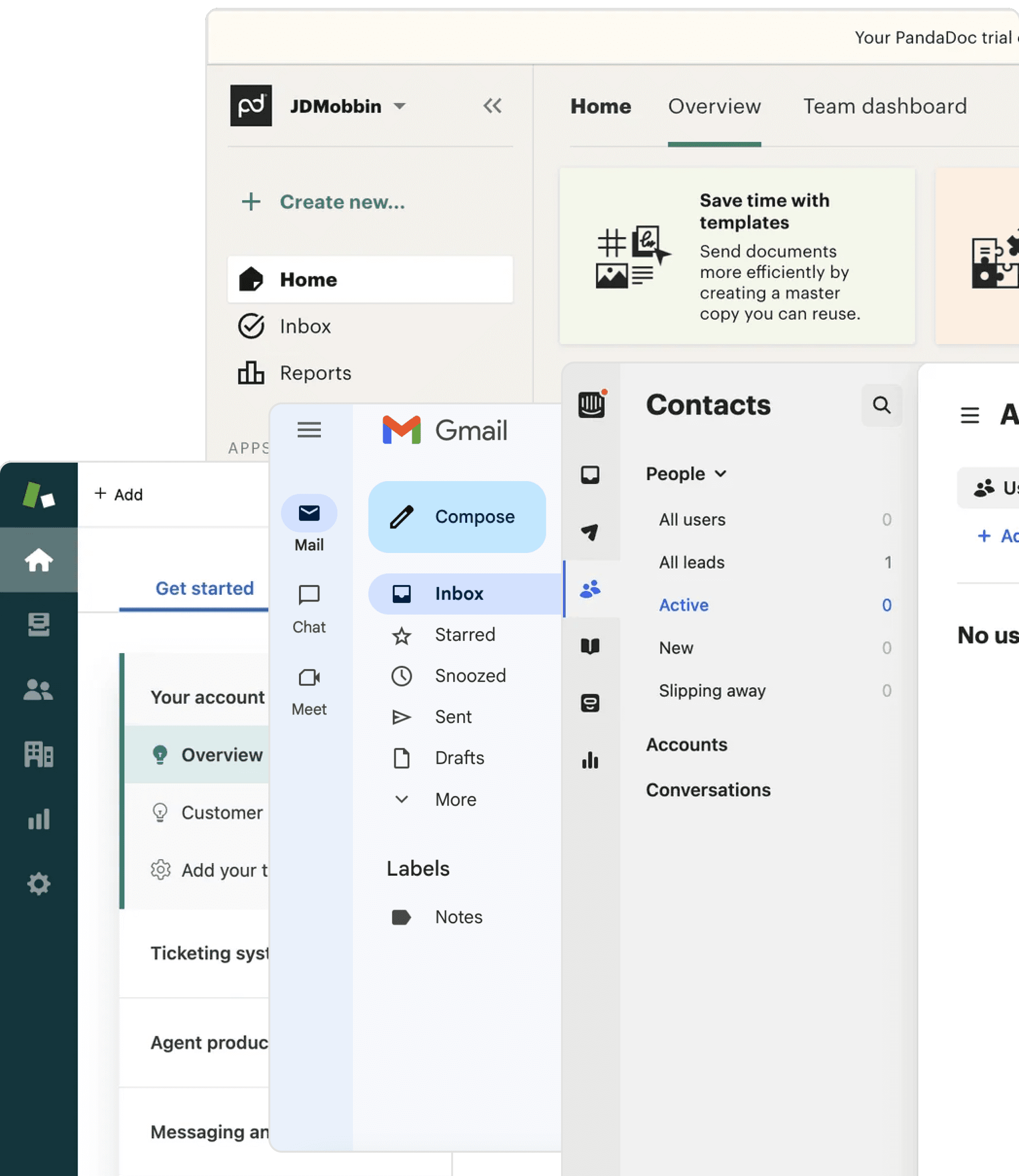
Structure Explorations

Navigation patterns and hierarchy

Main Goal

The current switcher pattern hid content hierarchy. Users needed to see primary, secondary, and tertiary navigation levels simultaneously to understand the full feature landscape without cognitive overhead.

Approach tested

Approach tested

I sketched and prototyped three layout options, tested them internally, and weighed their trade-offs:

I sketched and prototyped three layout options, tested them internally, and weighed their trade-offs:

1. Primary + Secondary on top, Tertiary on left

Cluttered, difficult to scale

Actions felt disconnected

2. Primary + Secondary on left, Tertiary on top

Elements too compressed → frequent misclicks

Reduced accessibility

3. Primary on left, Secondary wider on left, Tertiary on top

Clearer organization and scanability

Sections easier to read and distinguish

Took too much screen space
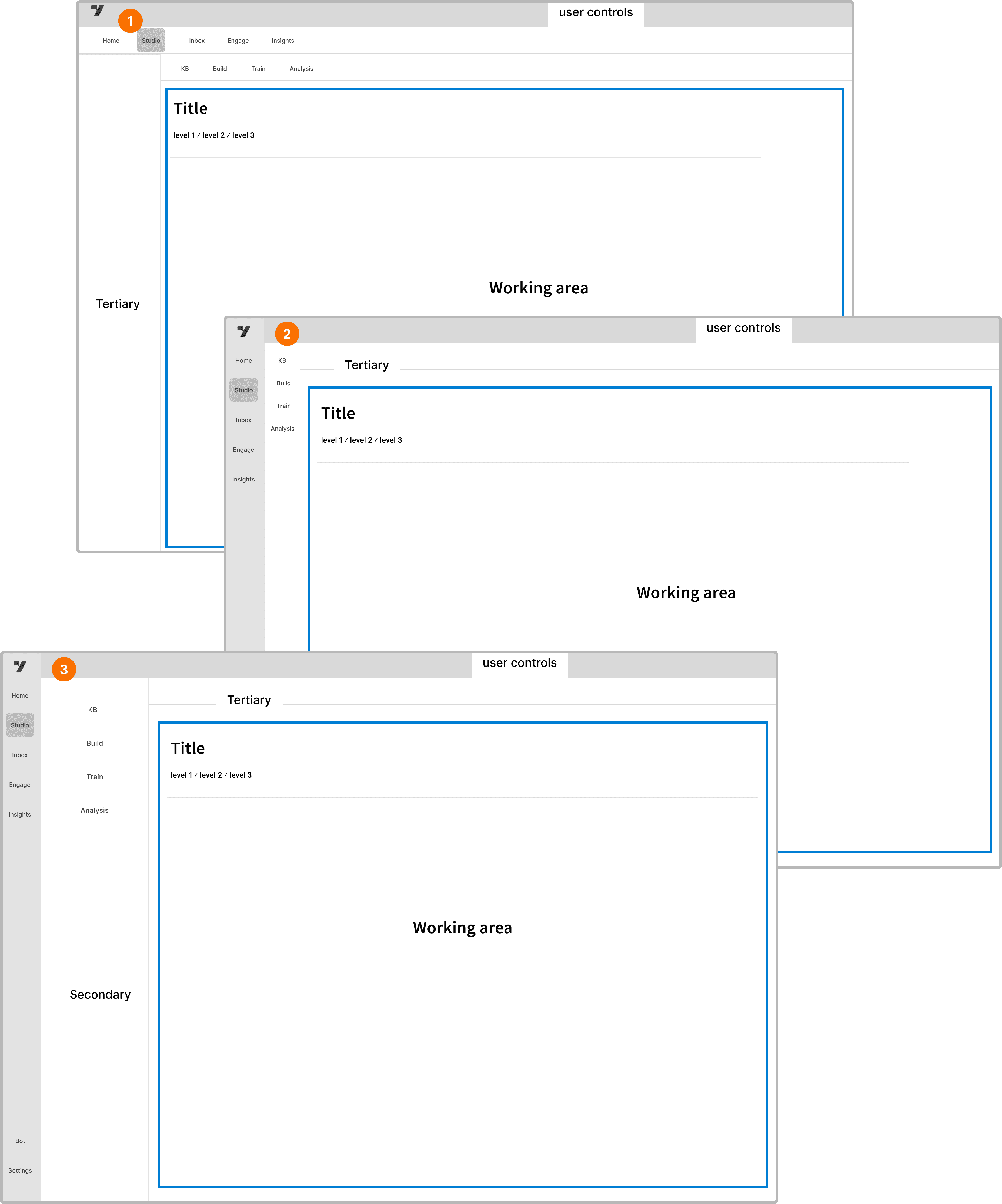
Visual representation of approach tested

Visual representation of approach tested

Saw navigation is confusing users during customer demos for feature walkthroughs.

Final Solution: Hybrid Approach

I took the collapsible navigation feature from my competitor analysis and combined it with the best aspects of Option 3 to arrive at the final solution.

Visual representation of approach tested

Color & Visual System Explorations

Creating clear visual hirerachy and module differentiation

Main Goal

Users needed immediate visual cues to distinguish between modules and their current location. Color coding had to be subtle enough to not overwhelm but distinct enough to aid quick recognition.

Approach explored

Approach explored

I tried these 3 top choices:

I tried these 3 top choices:

High Contrast: Bold dark side bar with strong contrast

Provided clear module separation

Felt too heavy and was grabing too much attention during the key workflows

Minimal Monochrome: Light neutral colors

Clear neutral approach

Elegant but lacked sufficient way-finding visual cues for highlighted modules

Light sidebar with subtle accent colors

Provided clear module separation

Perfect balance of clarity and visual hierarchy

Final Direction

Implemented a subtle accent system where each module has a gentle color hint on active states and icons, while maintaining a clean neutral base. This provided way-finding without visual noise.

Interaction Patterns Explorations

Defining how users navigate and discover content

Main Goal

The interaction model needed to support both focused work (collapsed sidebar for more workspace) and exploratory behavior (expanded view for feature discovery). Users should control their experience.

Behaviors Tested

Behaviors Tested

Auto-collapse on Action

Sidebar auto-hides when user selects feature - maximizes workspace

Progressive Disclosure

Click to expand sections, hover for quick previews

Final Direction: Persistent state memory

System remembers user's preferred expanded/collapsed sections. The navigation adapts to user behavior patterns rather than forcing a single interaction model.

Collaboration

Getting to the solution wasn't just about design decisions — it was about alignment

4

Stakeholder Groups

Stakeholder Groups

Stakeholder Groups

Designers | Engineers | PMs | Leadership

15+

Alignment Sessions

Alignment Sessions

Alignment Sessions

Critques | Reviews | Presentations

Design Critiques

Ensured feature placement alignment with module teams

Engineering Partnership

Engg Partnership

Fine tuned interaction timing and caught UX issues early

PM Alignment

Used data + research to shift from opinions to evidence
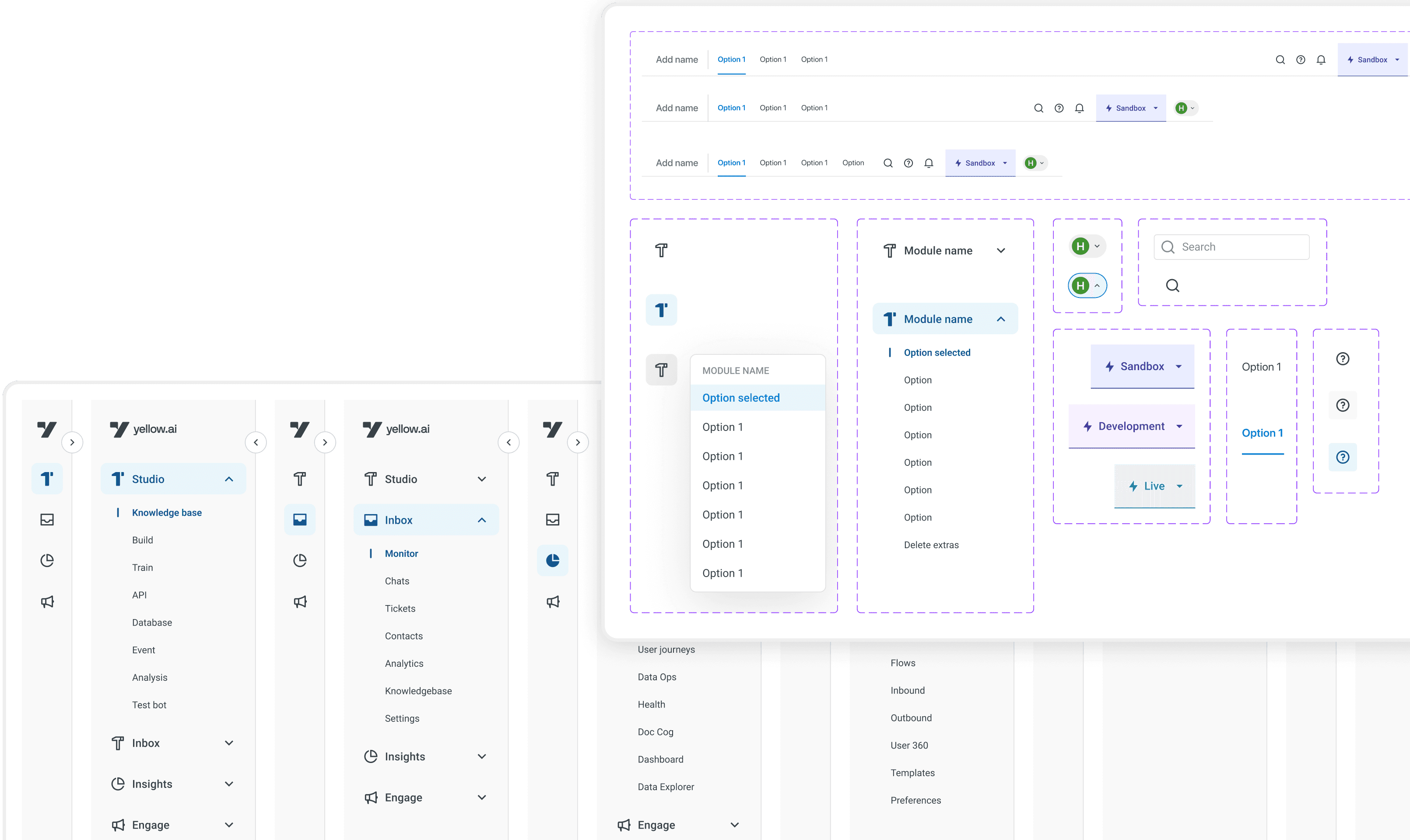
Let's see how does the final solution look like

Let's see how does the final solution look like

Collapsed state

Expanded state

Top navigation

Collapsed state

Expanded state

Top navigation

Collapsed state

Expanded state

Top navigation

Final results: post-launch

Final results: post-launch

50%

instant reduction in time to navigate from point A to point B at any given instance.

50%

instant reduction in time to navigate from point A to point B at any given instance.

50%

instant reduction in time to navigate from point A to point B at any given instance.

22%

increase in the findability of features and goal completion points across the product.

22%

increase in the findability of features and goal completion points across the product.

22%

increase in the findability of features and goal completion points across the product.

52%

improvement in usability measure via the score using keystroke level model.

52%

improvement in usability measure via the score using keystroke level model.

52%

improvement in usability measure via the score using keystroke level model.

2.58s

to navigate from Point A to Point B as compared to previous 5.28s

2.58s

to navigate from Point A to Point B as compared to previous 5.28s

2.58s

to navigate from Point A to Point B as compared to previous 5.28s

93.74K

users switched between modules using the navigation in the closed state

93.74K

users switched between modules using the navigation in the closed state

93.74K

users switched between modules using the navigation in the closed state

45.31K

users switched between modules by opening the side drawer

45.31K

users switched between modules by opening the side drawer

45.31K

users switched between modules by opening the side drawer

53%

of users think it's easier to find what they are looking for

53%

of users think it's easier to find what they are looking for

53%

of users think it's easier to find what they are looking for

58%

of users rated the new experience 4 stars and above

58%

of users rated the new experience 4 stars and above

58%

of users rated the new experience 4 stars and above

50%

reduction in time taken to navigate from point A to B

50%

reduction in time taken to navigate from point A to B

50%

reduction in time taken to navigate from point A to B

Learnings

Learnings

Driving Alignment

Turned a complex, high-risk change into a phased rollout by combining design and PM leadership to keep teams moving in sync.

Saw navigation is confusing users during customer demos for feature walkthroughs.

Storytelling with Data

Used insights from Mixpanel, Hotjar, and interviews to influence decisions and get engineers, PMs, and leadership on board.

Securing Buy-in

Earned founder-level support, elevating the project from a “nice-to-have” idea to a company-wide priority.
More projects

More projects

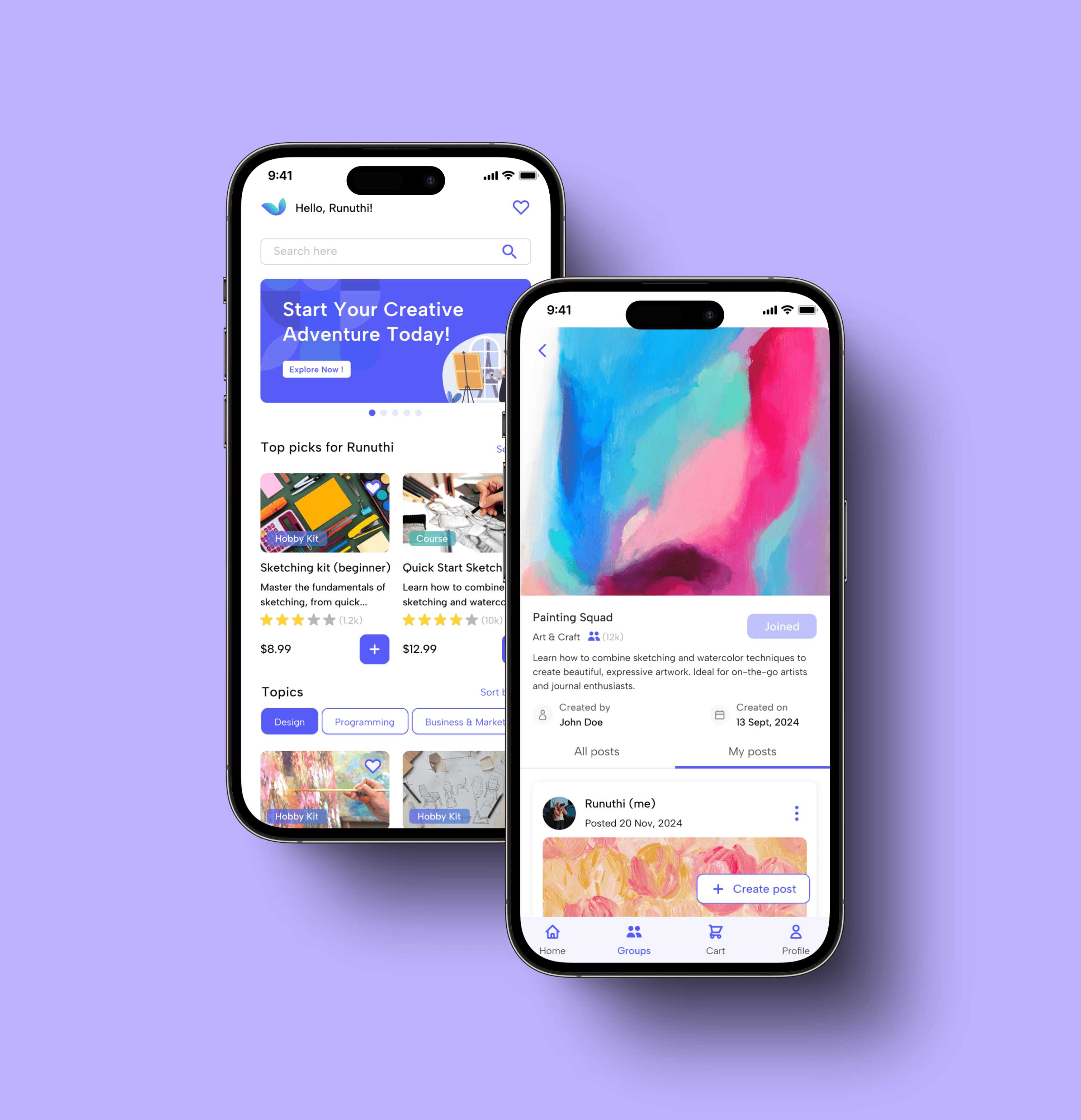
Redefining hobby exploration with Twiddle

Created a platform for learning, supplies, and community to make hobbies fun and accessible.

B2C

E-commerce

Mobile App

UX design & Research

Reimagined shopping with AI Mode for millions of users

Designed AI Mode responses to reduce cognitive load and improve journey continuation. 37% of users preferred the proposed direction.

UX design

B2C Shopping

AI Mode

Design Testing

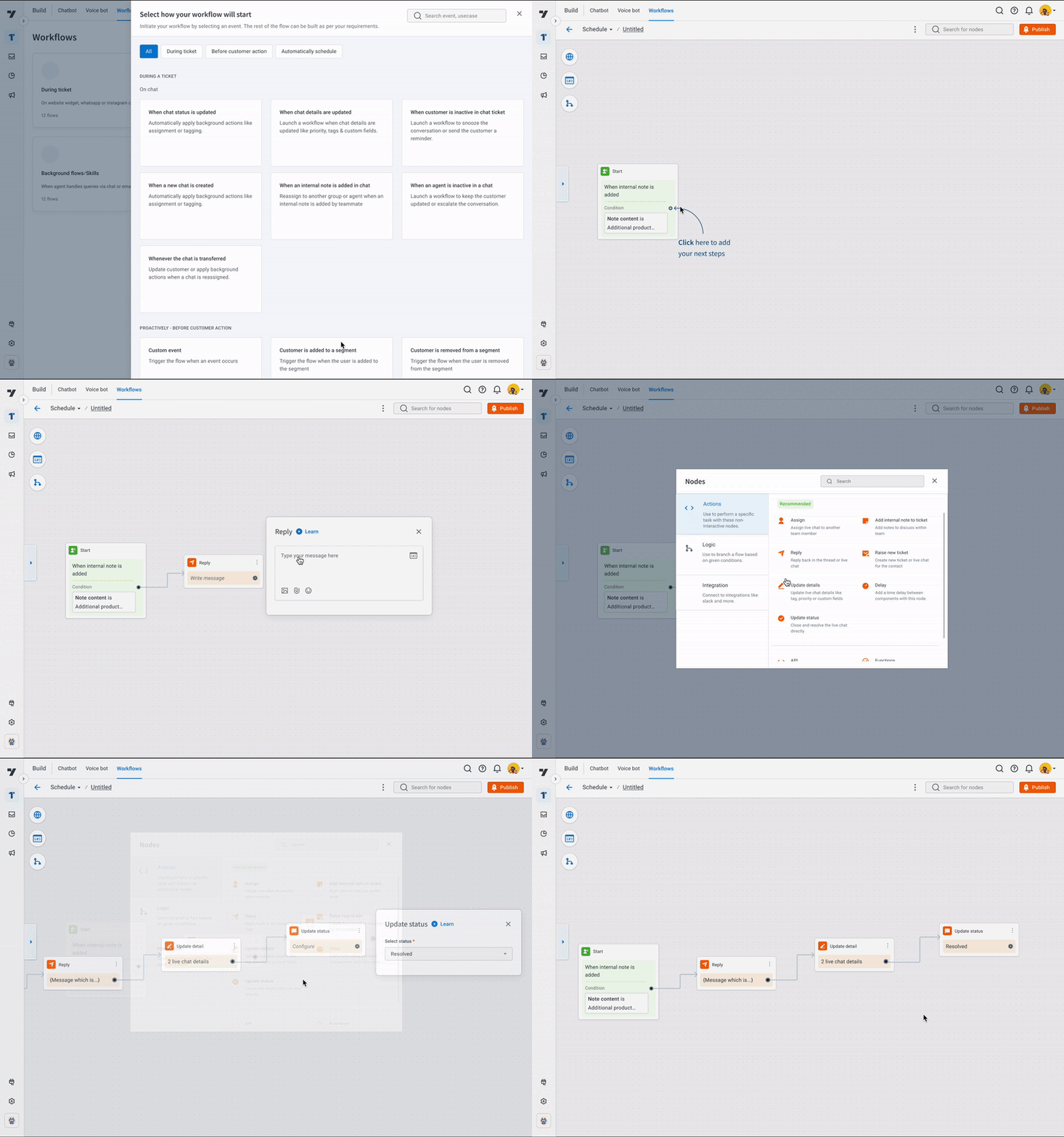
Support workflows to automate manual tasks by 70%

Automated repetitive tasks by creating workflows, letting agents set them up once and handle cases automatically.

B2B Saas

UX design & Research

New feature

Reimagined shopping with AI Mode for millions of users

Designed AI Mode responses to reduce cognitive load and improve journey continuation. 37% of users preferred the proposed direction.

B2C Shopping

AI Mode

UX design

Design Testing

Support workflows to automate manual tasks by 70%

Automated repetitive tasks by creating workflows, letting agents set them up once and handle cases automatically.

B2B Saas

New feature

UX design & Research

Redefining hobby exploration with Twiddle

Created a platform for learning, supplies, and community to make hobbies fun and accessible.

B2C

E-commerce

UX design & Research

App

Support workflows to automate manual tasks by 70%

Automated repetitive tasks by creating workflows, letting agents set them up once and handle cases automatically.

B2B Saas

New feature

UX design & Research

Reimagined shopping with AI Mode for millions of users

Designed AI Mode responses to reduce cognitive load and improve journey continuation. 37% of users preferred the proposed direction.

B2C Shopping

AI Mode

UX design

Design Testing

Redefining hobby exploration with Twiddle

Created a platform for learning, supplies, and community to make hobbies fun and accessible.

B2C

E-commerce

UX design & Research

App

My Contributions

Managed end to end design experience, got deep into previous navigation data to take right decisions.

Duration

6 weeks, 3 phases to ship smoothly and address regular feedback

Key actions

Analysing data, presenting problem areas and proposing solutions

Team

2 Designers, 2 Product Managers, 4 Developers

Problem Statement

How might we

make the switcher navigation easier to use for the 70% of users who find it confusing?